
If you’ve ever stood at a metro gate only to find your Nol card no longer works, you’ve likely wondered, “How Do I Reactivate My Expired Nol Card?” It’s a common situation for Dubai residents and commuters who depend on the Nol card for daily travel across metros, buses, trams, and even parking. While reactivation is a straightforward process through the RTA website or Nol Pay app, many users run into unnecessary delays because of avoidable mistakes. Understanding what not to do can make your Nol card renewal smooth, quick, and stress-free.
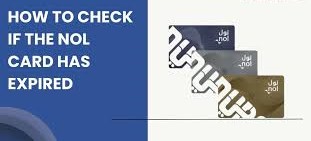
1. Ignoring the Card Expiry Date
One of the most frequent errors commuters make is overlooking their Nol card’s expiry date. Every Nol card—Silver, Gold, Blue, or Red—comes with a five-year validity from its issue date. Once that time passes, it can’t be recharged or used. Many people only discover this at the station gate when the card fails to work. To avoid that hassle, make it a habit to check your expiry date through the Nol Pay app or the RTA website regularly. It takes seconds and helps you plan ahead.
2. Not Verifying Card Status Before Starting Reactivation
Sometimes a Nol card stops working due to a technical glitch rather than actual expiry. Before starting the reactivation process, confirm your card’s status online. Enter your Nol card number on the RTA website or scan it using the Nol Pay app. This quick check tells you if your card is truly expired or simply needs a refresh or minor update, saving you both time and effort.
3. Forgetting Your Emirates ID
Your Emirates ID plays a vital role in reactivating personalized Nol cards. Since these cards are directly linked to your identity, RTA requires your Emirates ID number and personal details for verification. Many users try to renew their cards without having their Emirates ID handy, which leads to delays. Always keep your ID and accurate details ready before starting the reactivation.
4. Submitting Wrong or Incomplete Information
It’s easy to make small errors when filling out online forms, but even a typo in your Nol card number or contact information can cause a delay. Double-check every field—especially your Emirates ID, phone number, and email—before you submit. If something doesn’t match RTA records, your request could be rejected. Accuracy ensures your reactivation moves forward without interruptions.
5. Skipping the Replacement Fee Payment
When your Nol card expires, RTA doesn’t simply “turn it back on.” Instead, a new card is issued, and this comes with a replacement fee of 70 AED. The fee covers both administrative and system update costs. Some users mistakenly skip this step, assuming the process is free, which results in pending applications. Be sure to pay the fee promptly through the Nol Pay app, RTA website, or at an RTA Customer Happiness Center to finalize your request.
6. Forgetting to Track the Application Status
Once you’ve submitted your reactivation request, RTA provides a reference number. Don’t ignore it. Many people assume the new card will just arrive or activate automatically, but that’s not always the case. You should use this number to track your application on the RTA website or app. This helps you catch any missing details early and avoid unnecessary waiting.
7. Expecting to Use the Old Card Again
A common misconception is that the same card will be reactivated. In reality, once your Nol card expires, it’s permanently deactivated for security reasons. The RTA issues a new card and safely transfers your remaining balance to it. Trying to reuse the old card or tap it at the metro gate will only cause confusion. Make sure you activate and start using your new one instead.
8. Forgetting to Activate the New Card
Even after getting your new Nol card, it won’t work immediately until it’s activated. This step is simple: just top it up at a metro station, Nol top-up machine, or bus stop, then tap it on a reader. This action syncs your balance and confirms activation. Many commuters skip this and wonder why their reactivated card doesn’t work yet.
9. Ignoring Future Expiry Alerts
Once you’ve gone through the hassle of reactivating your Nol card, it’s smart to avoid a repeat. The RTA offers expiry notifications that remind you when your card is nearing expiration. You can enable these through the Nol Pay app or your RTA account. These alerts ensure your card stays active and you never face travel disruptions again.
10. Assuming All Nol Cards Have the Same Rules
Each Nol card type has its own rules for expiry and renewal. For example, Red tickets are disposable and can’t be reactivated, while personalized Blue cards require ID verification. Silver and Gold cards can be easily replaced online or at RTA centers. Knowing your card type helps you follow the right process and prevents confusion.
Bonus Tip: Keep a Backup Travel Option
If your Nol card is under renewal, consider using the Nol Pay virtual card or mobile payment options supported by RTA. These digital tools allow you to continue traveling around Dubai without interruption while your physical card is being reissued.
Conclusion
Understanding how to reactivate an expired Nol card is simple, but avoiding these common mistakes makes all the difference between a smooth process and a stressful one. By regularly checking your card status, keeping your Emirates ID ready, entering accurate details, and paying the required fee on time, you’ll have your Nol card reactivated without delays. The Nol card system is designed to make travel across Dubai efficient and effortless—just stay proactive and organized. Next time someone asks, “How Do I Reactivate My Expired Nol Card?”, you’ll not only know the answer but also the smart ways to do it right the first time.

Aima Samson
22 posts
-
 Xe máy vượt ẩu tông trực diện xe đi đúng chiều
Xe máy chạy sang làn ngược chiều để vượt ôtô và xe bồn phía trước, rồi tông trực diện xe đi đúng phần đường.
-
 Kia Sportage lần đầu có bản hybrid tại Việt Nam
Sporatge 2026 ra mắt hôm 6/6, ngoại, nội thất thay đổi, lần đầu bổ sung lựa chọn máy hybrid 1.6 với tùy chọn dẫn động một hoặc hai cầu.
-
 Ôtô vào bệnh viện đưa đón bệnh nhân có mất tiền gửi xe?
Xin hỏi trường hợp xe vào bệnh viện chỉ để đưa đến hoặc đón bệnh nhân về có mất tiền gửi xe. (Hoàng Linh)
-
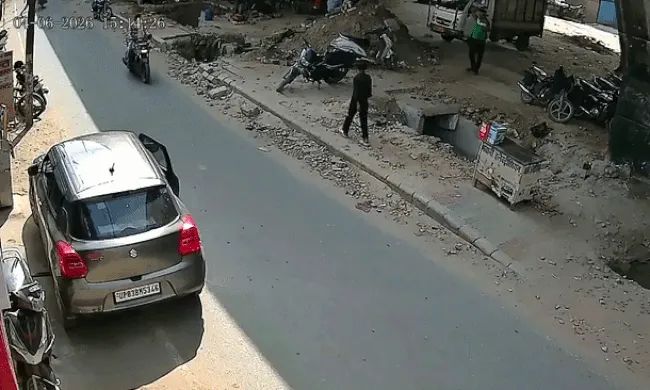 Cửa ôtô bật mở làm người đi xe máy thiệt mạng
Cửa bên lái của chiếc ôtô đỗ bên đường đột ngột bật mở khiến xe máy cùng chiều vừa chạy tới đập vào, ngã ra đường.
-
 'Vỡ mộng' xe điện, Hyundai dùng nhà máy sản xuất xe hybrid cho Kia
Mẫu Kia Sportage Hybrid sẽ không còn hoàn toàn phụ thuộc vào nhập khẩu khi xuất xưởng ở nhà máy nơi Hyundai vốn dành cho xe điện.
-
 Ôtô điện Trung Quốc ngày càng 'béo phì'
Ôtô của Trung Quốc đã tăng 392 kg trong 12 năm, đặc biệt khi kỷ nguyên xe điện phát triển mạnh.
-
 Ôtô điên cuồng trốn cảnh sát sau tranh cãi
Cảnh sát chặn một chiếc Tesla màu trắng để xử lý vi phạm nhưng tài xế phản đối, thậm chí chửi bới trước khi lái xe bỏ chạy.
-
 Geely Coolray ra bản mới sau một năm, giá từ 499 triệu đồng
Mẫu SUV cỡ B của Geely nâng cấp công nghệ hỗ trợ lái, bổ sung tiện nghi nội thất và hạ giá khởi điểm xuống còn 499 triệu đồng.
-
 Geely Okavango ra mắt: SUV cỡ D giá từ 739 triệu đồng
Geely Okavango ra mắt tại Việt Nam với giá từ 739 triệu đồng, trở thành một trong những mẫu SUV cỡ D 7 chỗ có giá thấp nhất thị trường.
-
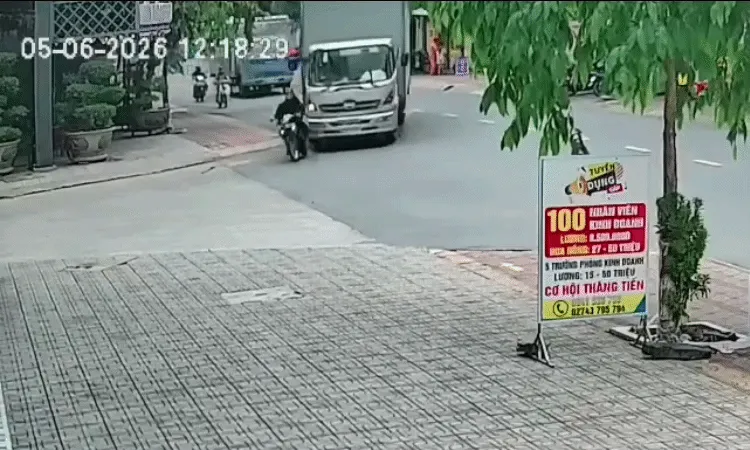 Người lái xe máy vái lạy xe tải sau va chạm
Xe máy tăng tốc lách trái để vượt khi xe tải đang rẽ tại ngã ba nên xảy ra va chạm.
-
 'Cha mẹ ở đâu khi những đứa trẻ ra đường như thiêu thân'
Phụ huynh phải là người bị phạt nếu tình trạng những đứa trẻ tự do băng ngang đường ngày càng nhiều.


