Managing inventory and setting restrictions on purchase quantities are critical for running a successful WooCommerce store. Whether you want to protect your stock from bulk purchases, limit how much a customer can order, or ensure balanced availability, WooCommerce Limit Cart Quantity Plugin is the perfect solution.
This plugin offers comprehensive cart checkout restrictions, allowing you to set minimum and maximum limits on cart amounts, product quantities, or items per customer. These restrictions can be applied store-wide, to specific products, or even based on user roles. The WooCommerce Cart Limits plugin helps you maintain control over purchases, optimize inventory management, and improve customer experience.
For many store owners, managing large orders and preventing stock shortages can be a challenge, especially when customers attempt to buy in bulk. The WooCommerce Cart Limits Plugin allows you to enforce clear boundaries, ensuring that every customer has a fair opportunity to purchase the products they want.
This plugin enables you to:
By setting up rules to automatically enforce these limits, you can streamline your order management process and reduce the risk of overselling products.
Let’s explore the features that make this plugin essential for inventory management and order control.
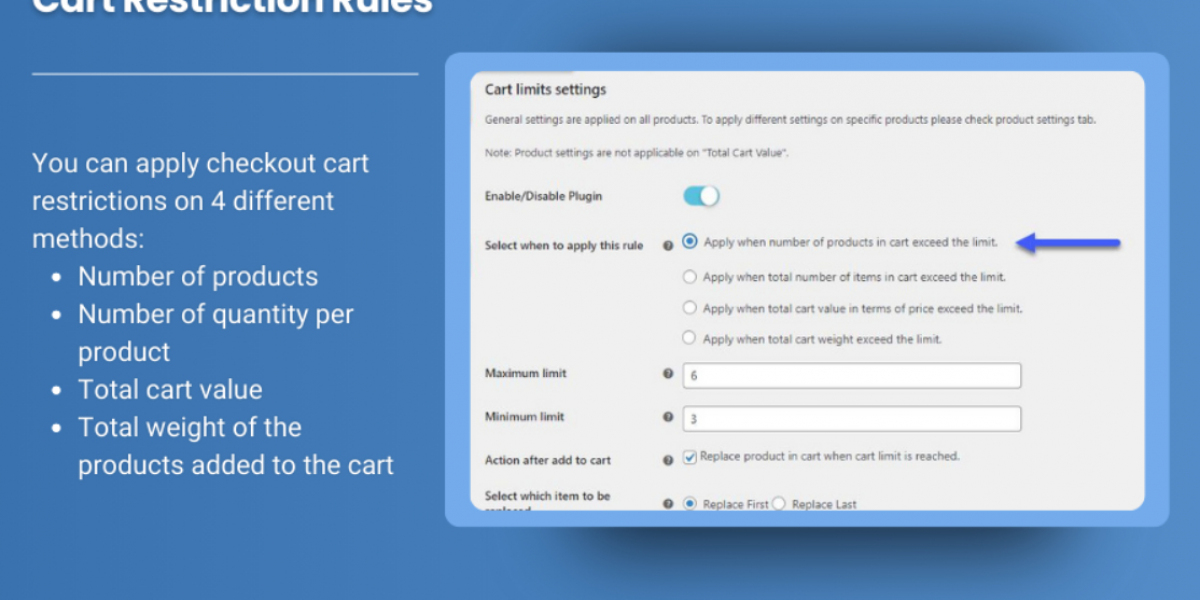
With the WooCommerce Limit Cart Quantity Plugin, you can set minimum and maximum limits on the total cart value or product quantities. For example, you can establish a rule that prevents customers from checking out if their cart value exceeds $500 or if they attempt to add more than 10 units of a specific product.
These restrictions help manage inventory more effectively, especially when you have limited stock or need to prioritize smaller orders.
Once a customer reaches the maximum limit of a product or total cart value, the plugin can automatically stop them from adding more items to the cart. Alternatively, you can allow customers to continue shopping but replace items in their cart. This gives customers more flexibility while ensuring that they comply with your purchasing rules.
You can choose to replace either the first item added to the cart or the last item, depending on your preference. This feature ensures that customers can still adjust their orders while adhering to the cart restrictions.
To make it easier for customers to manage their cart, the WooCommerce Cart Limits plugin offers the option to replace the first or last item in the cart when they reach the maximum quantity or cart value. This provides a seamless shopping experience while enforcing the cart rules you’ve set.
For example, if a customer tries to add an 11th item but your store has a 10-item limit, they can either remove an item themselves or have the first item they added automatically replaced by the newest one.
Effective communication is key when enforcing cart limits, and this plugin enables you to display customizable messages that clearly inform customers of the restrictions. Whether it's a message about the minimum or maximum purchase quantity, cart value, or weight limit, you can tailor the text to suit your store’s tone and guidelines.
This feature ensures that customers understand why their cart is restricted, reducing confusion and preventing frustration during checkout.
If you manage heavy or bulky products where shipping costs are tied to weight, the WooCommerce Cart Limits Plugin allows you to set restrictions based on the total cart weight. This ensures that customers don’t exceed your store’s shipping policies or capacities.
For example, if your shipping provider only supports packages up to 50kg, you can set a maximum cart weight to prevent customers from adding more than that limit. This helps you avoid unexpected shipping issues while offering customers a clear and transparent shopping experience.
The WooCommerce Quantity Increment Plugin is a great complement to the Cart Limits Plugin. By integrating both plugins, you can enhance the user experience by adding quantity increment buttons to your product pages, allowing customers to easily increase or decrease the number of items they want to purchase.
This feature not only streamlines the shopping process but also ensures that customers stay within the cart limits you’ve set. Together, these plugins provide a robust solution for managing purchase quantities and improving customer satisfaction.
The WooCommerce Cart Limits Plugin offers a range of benefits for store owners, including:
Getting started with the WooCommerce Cart Limits Plugin is simple. Follow these steps:
The WooCommerce Limit Cart Quantity Plugin is an essential tool for store owners looking to control inventory, manage order sizes, and prevent bulk purchases. By setting precise limits on cart amounts, product quantities, and order weights, you can streamline your sales process while maintaining fair access to products.
With the added benefits of customizable cart messages and the option to replace items in the cart, this plugin ensures a smooth and satisfying shopping experience for your customers.
Enhance your store today with the WooCommerce Limit Cart Quantity Plugin and take control of your inventory like never before!

Amber Quin
4 posts